Yesterday, I lost my access to the Internet on my main computer running Windows 7.
The tiny network logo in the bottom of the screen had an even tinier yellow warning triangle on it. A little fiddling with Windows' "Network and Sharing Center" and the Microsoft diagnostic tools concluded that my computer Cannot Access DNS Server.
OK. Reboot. Boot the router. Boot the DSL modem. No go.
Upstairs to the kitchen computer. Everything is cool. Try the iPad - cool there too! Only the hardwired computer has a problem. Blew an hour or more looking for a wiring problem.
It took me a while to find this post on the Tech Support Guy site. And this post at A Technical Journey. Yes indeed, McAfee caused this problem with a an update back in mid-August.
I, of course, don't install software updates until they have been out for a while so that the vendors can fix this kind of bug. I made the mistake of letting McAfee update itself two days ago, then rebooted yesterday to sever my Internet link! Wouldn't you think they might just delete updates that cause this?
As I have stated many times, I have had to fix far more problems caused by Antivirus software than by virus and malware.
Wednesday, September 5, 2012

Sunday, June 10, 2012
Oprah and I
We really are two nations, divided! I realized it this week when I noted all the praise for Oprah Winfrey's remarks in
her commencement speech at Spelman College in Atlanta on May
20. Her remarks included this:
"Always be excellent. People notice. You go to Taco Bell and someone gives you extra napkins and sauce. That’s right, even at Taco Bell, excellence is noticed."Of course, that just happens to be one of my pet peeves when visiting a Taco Bell. I usually make a very specific order of "... and one hot sauce." I then look at those extra sauce packets and napkins that I don't want and think, "what a waste - giving away the store's profits." Funny how Oprah and I notice the same thing but think quite differently about it.
Wednesday, May 2, 2012
My Sears Craftsman Self-propelled Mower Won't Propel Itself!
My Sears Craftsman lawnmower had been losing its "oomph" as a self-propelled device during the past year. One round with it this spring and I knew it was time for some repairs. I started by looking into the drive mechanism located under the large plastic cover on the front of the mower.

I had expected to find a slipping belt, worn pinch-roller or other item possibly needing adjustment. Instead, everything under the hood looked OK. It was just that the wheels seemed to not engage with the drive mechanism. I pulled off a front "driving wheel" and took a look. This picture shows a new wheel on the left and my worn one on the right

And here is a closer look at the worn teeth:

The gear teeth on the plastic wheel were worn down in some places on one side and totally worn off on the other. Here is the driving gear that chops up the plastic:

O.K. whose bright idea was it to make the driven wheels out of plastic? I can just imagine the discussion between some mechanical engineer and a cost accountant, "Sure it will work for a while, but then ..."
Obviously the engineer lost that argument.
I drove over to the local Sears Repair and Parts location. (Eden Prairie Center if you live in the Twin Cities area.) With a wheel in-hand, I told the clerk that I needed two replacements. Here's the best part: I didn't even have to show them the part number! "It's one of our most common replacement parts," said the other clerk as she rang them up.
Well, duh!
I had expected to find a slipping belt, worn pinch-roller or other item possibly needing adjustment. Instead, everything under the hood looked OK. It was just that the wheels seemed to not engage with the drive mechanism. I pulled off a front "driving wheel" and took a look. This picture shows a new wheel on the left and my worn one on the right
And here is a closer look at the worn teeth:
The gear teeth on the plastic wheel were worn down in some places on one side and totally worn off on the other. Here is the driving gear that chops up the plastic:
O.K. whose bright idea was it to make the driven wheels out of plastic? I can just imagine the discussion between some mechanical engineer and a cost accountant, "Sure it will work for a while, but then ..."
Obviously the engineer lost that argument.
I drove over to the local Sears Repair and Parts location. (Eden Prairie Center if you live in the Twin Cities area.) With a wheel in-hand, I told the clerk that I needed two replacements. Here's the best part: I didn't even have to show them the part number! "It's one of our most common replacement parts," said the other clerk as she rang them up.
Well, duh!
Monday, December 26, 2011
I Just Installed a Software Upgrade on my iPad and Now the Apps Won't Run
I've never been a fan of Apple.
 This probably goes back to the Macintosh with the 9-inch black and white monitor with its 512 pixel-wide screen. Good idea, poorly implemented. This probably is the real Apple Corporate Motto, pasted on a back wall in Cupertino in Sanskrit.
But, the iPad has become the place where really creative people put forth their best efforts creating application programs for computers. Once again, Microsoft missed the boat. They didn't invent a store to sell cheap application programs and didn't think up a clever name for them, like "Apps!" So while the whole world is buying and selling sophisticated programs for between one dollar and five dollars, Microsoft is still out there trying to sell a word processing program for $120. Good luck on that.
So, the iPad is the place to be to use this stuff. The screen is still only nine inches, just like that 1984 Mac, but at least you can pick it up and hold it so you can see it. I caved. Santa brought us an iPad Saturday night.
I loaded up a few Apps. Angry Birds, of course! Netflix and the Kindle reader, then a nifty photographer's guide to where the sun will be on any day of the year at any place. Throw in a few restaurant guides and we were ready to hit the road! My Travel Blog is here.
But, why not also make sure the iPad operating system is current too? So I upgraded to the current version of iOS. I then clicked on one of my application programs (Okay, an "App") and nothing happened. Well, it briefly started to expand, then contracted back to icon size. What the heck?
The restaurant guide, the Kindle reader, LightTrac - nothing! But Safari, e-mail? Yeah, those work.
Searched the web. Found this marvelous website, where people have been complaining about this problem from April 15 through December 22 of 2011.
Lots of interesting solutions are mentioned but non quite as good as the one I found on another thread which was "Just download another free application from the App Store. This fixes it. Then remove the newly installed App."
Worked like a charm.
It was also educational to find that there are people who recommend a "hard reset" for the iPad just like the people who inhabit Windows forums and suggest, "wipe the disk and reinstall the operating system."
But, the iPad has become the place where really creative people put forth their best efforts creating application programs for computers. Once again, Microsoft missed the boat. They didn't invent a store to sell cheap application programs and didn't think up a clever name for them, like "Apps!" So while the whole world is buying and selling sophisticated programs for between one dollar and five dollars, Microsoft is still out there trying to sell a word processing program for $120. Good luck on that.
So, the iPad is the place to be to use this stuff. The screen is still only nine inches, just like that 1984 Mac, but at least you can pick it up and hold it so you can see it. I caved. Santa brought us an iPad Saturday night.
I loaded up a few Apps. Angry Birds, of course! Netflix and the Kindle reader, then a nifty photographer's guide to where the sun will be on any day of the year at any place. Throw in a few restaurant guides and we were ready to hit the road! My Travel Blog is here.
But, why not also make sure the iPad operating system is current too? So I upgraded to the current version of iOS. I then clicked on one of my application programs (Okay, an "App") and nothing happened. Well, it briefly started to expand, then contracted back to icon size. What the heck?
The restaurant guide, the Kindle reader, LightTrac - nothing! But Safari, e-mail? Yeah, those work.
Searched the web. Found this marvelous website, where people have been complaining about this problem from April 15 through December 22 of 2011.
Lots of interesting solutions are mentioned but non quite as good as the one I found on another thread which was "Just download another free application from the App Store. This fixes it. Then remove the newly installed App."
Worked like a charm.
It was also educational to find that there are people who recommend a "hard reset" for the iPad just like the people who inhabit Windows forums and suggest, "wipe the disk and reinstall the operating system."
Thursday, December 22, 2011
No Respect For the Payroll Department
It's a classic battle of the little guy versus the elite. And, as usual, the elite are winning.
Who are the elite? The President and the United States Senate. The little guy? Your local payroll department that issues your check every week, on time and for the correct amount.
The House of Representatives passed a one-year extension of the current payroll-tax rate for FICA-SS which, otherwise, would revert to 6.2% from 4.2% on January 1st. Action required in the payroll department? None. Just the usual year-end hustle, otherwise, have a nice holiday season.
Not content to let things be simple, the Senate countered with a bill that would extend the current rates for only two months. And to top it off, they slipped in the $18,350 kicker!
$18,350? Yes, indeed. The politicians want to make sure that no high-rollers, that is, people making over $9,175 per month get away with any extra money. Not to mention the evil forces of management who might be expecting a bonus check sometime in January.
So they put in a provision that any amount of earnings in excess of $18,350 paid during January-February will be taxed at 6.2% and not at 4.2%
I can almost guarantee you that there is no switch to be flipped in your employer's payroll system that will implement that change!
Many people are paid with a payroll system that has been neglected, patched and repaired for many years. I talked a few years back with one contract programmer who maintained the payroll system for the engineers on a railroad. The system had to accommodate both a differential for miles on uphill grade and downhill grades - plus a differential for passage through "Indian Territory." Those provisions were still in the contract under which the engineers operated. I hope my friend is still available and on call for the week after Christmas.
So where do the payroll departments of the country stand on this issue? Well just Google "payroll tax 18350" and follow a few of the links. Or follow this link to see the letter from the National Payroll Reporting Consortium. A quote:

That's right, the president thinks a two-month extension is preferrable to a twelve month extension. And the media buys it! Have you read or heard anything about the chaos that this two-month extension is going to cause?
Ah, well. Payroll never gets any respect.
As for me? I'm retired, so I don't have to deal with this issue. Just keep sending me those social security check, you young folks. And thanks for the 3.6% raise you are giving me on January 1st. Say, how are you paying for that raise when you quit putting 6.2% into the Social Security Trust Fund and dropped back to 4.2%? Well, I guess that goes in a different post.
Who are the elite? The President and the United States Senate. The little guy? Your local payroll department that issues your check every week, on time and for the correct amount.
The House of Representatives passed a one-year extension of the current payroll-tax rate for FICA-SS which, otherwise, would revert to 6.2% from 4.2% on January 1st. Action required in the payroll department? None. Just the usual year-end hustle, otherwise, have a nice holiday season.
Not content to let things be simple, the Senate countered with a bill that would extend the current rates for only two months. And to top it off, they slipped in the $18,350 kicker!
$18,350? Yes, indeed. The politicians want to make sure that no high-rollers, that is, people making over $9,175 per month get away with any extra money. Not to mention the evil forces of management who might be expecting a bonus check sometime in January.
So they put in a provision that any amount of earnings in excess of $18,350 paid during January-February will be taxed at 6.2% and not at 4.2%
I can almost guarantee you that there is no switch to be flipped in your employer's payroll system that will implement that change!
Many people are paid with a payroll system that has been neglected, patched and repaired for many years. I talked a few years back with one contract programmer who maintained the payroll system for the engineers on a railroad. The system had to accommodate both a differential for miles on uphill grade and downhill grades - plus a differential for passage through "Indian Territory." Those provisions were still in the contract under which the engineers operated. I hope my friend is still available and on call for the week after Christmas.
So where do the payroll departments of the country stand on this issue? Well just Google "payroll tax 18350" and follow a few of the links. Or follow this link to see the letter from the National Payroll Reporting Consortium. A quote:
In our opinion enactment of HR 3630 as written could create substantial problems, confusion and costs affecting a significant percentage of U.S. employers and employees.And just where does the president stand on this abomination? Well, here's one photo (thanks, Drudge) that captures him in a leadership role:

That's right, the president thinks a two-month extension is preferrable to a twelve month extension. And the media buys it! Have you read or heard anything about the chaos that this two-month extension is going to cause?
Ah, well. Payroll never gets any respect.
As for me? I'm retired, so I don't have to deal with this issue. Just keep sending me those social security check, you young folks. And thanks for the 3.6% raise you are giving me on January 1st. Say, how are you paying for that raise when you quit putting 6.2% into the Social Security Trust Fund and dropped back to 4.2%? Well, I guess that goes in a different post.
Saturday, August 13, 2011
Just Say NO to Adobe. Error Encountered While Writing File(s)
I'm wrestling with backup of my photos on Adobe Elements Organizer, version 9.
I love a couple of aspects of the product. The ability to organize tags in hierarchies is a key one. Display of photos with or without captions is another.
Of course it suffers from a few bugs and a lot of bad opinion. Wikipedia's current Image Organizer entry doesn't even include the product! The discussion page for the entry includes this gem, "...but buggy per Adobe forums."
Most of the bugs are really just clunky user interface issues, typical of Adobe products. O sure, it crashes when you stop on a file with a type that it doesn't like but willingly added to its catalog but I can live with that.
Let's just watch the backup process run, though. First you have to understand what the organizer does. It contains a nice SQL database in which it stores "metadata" about the photos along with thumbnail images to quickly display. So when it does a backup, it stores a proprietary index file and ultimately, the familiar .JPG files of the images! At least that was the scheme in the old version.
I have a nice tidy 49,500 images stored away. I kept these on version 3 of the original Adobe Organizer for many years after watching the reviews of new versions and reading of the travails of users who tried to upgrade. I finally upgraded when forced into it by a new computer with Windows 7. Adobe Organizer no longer would run. (Proof, by the way, that Adobe doesn't follow standard coding practices!)
Let's watch the backup function run. Here we get to see Adobe show us "clunky" like no one else can.
I click on the "Backup" entry in the file menu. Nothing seems to happen! Seventy five seconds later, a box appears allowing me to select Full or Incremental backup. There has been no indication that anything was going on. If, however, during the seventy-five second dead time you were to click on a photo on the screen, a rotating circle icon appears and spins for the balance of the time. I guess it is Adobe's version of "Hourglass on Demand."
After selecting Full Backup, there is about a ten second delay followed by the appearance of a box which says Calculating Total Media Size. At least now we get a "progress bar" as it takes ninety seconds to arrive at an estimate. By the way, the estimate is not shared with us at this point. When I select a drive for the backup, I learn it will take 98 gigs.
I select a drive and specify a catalog location. I now get a small box that says Please Wait While Elements Organizer Prepares For Backup... There is no progress bar. Nothing. For eight minutes and fifteen seconds. FMTT! Who wrote this thing?
Finally, after the eight minutes delay, a box with a progress bar appears and we are underway!

After a half hour, the back up is more than half complete.

There's no stopping us now! Don't I wish.
Somewhere north of 60% complete, that box goes away and this one appears:

Well, that's certainly helpful. What am I agreeing to when I click OK? That I like your error message?
But what happened? A bad backup disk? Let's look at the backup folder and see what was written.

That's interesting, about 58,000 .xml files then a .pref file and then start the .jpg files.
Look ahead to the end and we see a few thousand more .jpg files and the .buc or "backup catalog" file.

Now the old version of the organizer never wrote those .xml files. Does that have something to do with the problem? What is the overall status of the backup directory?

Say that's an interesting number, 65,533 total files were written before it crapped out. Isn't that a power of 2? Not quite. 2 to the 16th power is 65,536. But it is suspiciously close. I wonder if there is some limit on the number of files you can have in a single directory? Let's Google a little. Ah, here is a good site, Ask Leo:

I think we have found the problem! My backup disk came formatted as FAT32 and I was too lazy to reformat it to NTFS.
But really, in all of that checking and calculating that Adobe Elements Organizer did, couldn't it have mentioned that this number of files wouldn't fit on a FAT32 drive? Or couldn't there have been a warning at the start of the backup about the limit to a backup on a FAT32 drive was around 30,000 images? Or maybe, just maybe, when the backup did crap out a message about what type of error was encountered might be appropriate?
I suppose that everyone knows this but me. I'll try asking my wife, my boss, my son and see if they know the limit. Hey tomorrow is Sunday, I'll ask my priest, he uses a computer. How many of these people know the limit to how many files can be written in a single directory on a FAT32 drive. How many people would guess that Adobe would write 100,000 files to backup 50,000 pictures even if they did know the FAT32 file limit?
By the way, Microsoft Live Photo Gallery is almost good enough to replace Adobe Organizer. But not quite. Maybe one more upgrade. Go Microsoft! Or should I just say "to hell with it and buy Apple?"
UPDATE, 8/16/11:
I bought a new Passport drive via Amazon.com and it came formatted as NTFS. YEA! The backup program immediately (well, that's a relative term) ran to completion. Problem solved. For fellow nerds, the file count was:
49,470 original pictures (but a few had version sets behind them)
The backup wrote:
57,926 xml files mostly running about 7k in size
1 pref file of size 1k
49,546 jpg files mostly in the 200k-4,000k range
1 tly file of size 21,854k
1 buc file of size 179,675k
Any ideas what the extra xml files are all about? Or why they exist in the first place? Why not include them in the buc file and cut down on the number of files? O, well.
This was the final message from Elements:

And here is the catalog details box.

49,471 photos, 107,475 files in a single catalog in the folder. Your Mileage May Vary!
Sunday, April 3, 2011
Who Lost My EXIF Data?
NOTE: This post has a lengthy introduction that might be properly called "another of Tom's rants about Adobe" before getting to the loss of EXIF data. I just couldn't control myself. Sorry. Feel free to skip ahead to the next occurrence of EXIF if you are just looking for an answer to your data loss problem.
---------------------------------------------------------------------------------
I finally made an exit from Adobe Photoshop Album (APA). This dandy photo organizer has been my one true love since 2003. APA was released on February 18, 2003. This was convenient timing. I had retired 18 days earlier and we embarked on a lengthy driving trip to the sunny south on the 11th of February.
I carried along my first "real" digital camera, a Minolta Dimage X. This camera still rates in my mind as the best pocket digital camera ever produced. It got phenomenal reviews at the time of its introduction.
We had a great trip. We were on the road until March 27. In those six weeks we had warm weather and I took close to 700 pictures. It was our first time traveling with a computer and a digital camera and we chose our hotels this way:

I copied the photos over to my laptop PC each night and we viewed them and even sent a few along to friends and family in e-mails.
By the time we arrived home with 700 photos organized by day in a file structure, it was apparent that we needed some kind of photo organizer. I checked Popular Photography as well as other sources and settled on APA in spite of my love/hate relationship with Adobe.
Sure enough, Adobe managed to take a great product and screw it up beyond repair. They quit supporting the separate product, renamed it Organizer, bundled it into Photoshop Elements and then finally introduced the dreaded version 6! But just start typing into Google, "adobe photoshop organizer..." and watch the auto-completion box present some suggestions:
adobe photoshop organizer...
I did upgrade to version 3 which I think was the first version integrated with Photoshop Elements.
But each time I would consider upgrading to a more current version, I'd check the Amazon.com ratings and reviews and see a picture like this:
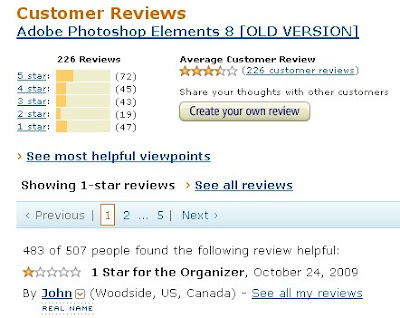
Look at the number of 1 and 2 star ratings. You just don't see that percentage of low ratings on very many products. Reading through the reviews for versions 6, 7, 8 and 9 over the years always prevented me from upgrading. I love this comment from the most helpful bad review on version 8:

If you can't quite make that out, it begins, "Adobe's customer support for PSE and Photoshop.com is like the products - very slow and buggy." That parallels my experience exactly right down to their infamous "reinstall windows."
So I simply stuck with Version 3 over the years. It has worked fine and I ended up with over 48,000 photos in it and very good performance. A couple of times I have had to use the "secret weapon" of holding down the Ctrl key when starting the product to rebuild the database but otherwise we have gotten along just fine.
But, Adobe finally did themselves in. Version 3 won't run under Windows 7. It started out looking OK when I installed it and moved the pictures via a Save and Restore. But Adobe's usual non-standard coding practices soon led to a lockup that wouldn't resolve itself. OK, time to bite the bullet and either upgrade or move to a new organizer product. I considered an upgrade to Photoshop Elements 8 or 9 but only long enough to read the reviews on Amazon shown above and another in this review for Adobe Premier Elements 8:
I loaded up the Microsoft Windows Live Photo Gallery. I had considered Picasa but having played with it earlier, I agreed with the assessment in this review. See this Wikipedia article for some comparisons between image organizers.
My, oh my, is Windows Live Photo Gallery a dandy product. It is fast! It supports tags beautifully. It has wonderful editing tools built into it for straightening and handling the "Levels" function that is so critical to fixing photos. Don't take my word for it. Try it on a few of your photos and you will be a happy camper.
I purged my photos from the new machine and started over, introducing them from their locations on the old machine. (I had gone back and made sure that I wrote the tags into the files for all of the pictures.) I quickly had 48,000 photos in the gallery and was searching and straightening. I soon introduced my wife to the product. She has been downstairs working on old photos for most of the last 24 hours since. I really expected her to be a hard sell because the interface is quite different. She loves it.
Where's my EXIF data?
Meanwhile, I loaded the 750 pictures from this year's driving trip through Texas and Louisiana onto the new machine. I did this from the kitchen laptop while she was working on pictures downstairs. Try doing that in Adobe Organizer. I casually mentioned the fact to her that those pictures would also be found in the new Photo Gallery. A bit later, she said to me, "there are a whole bunch of photos from years ago that all filed under the current date." "No way," I thought.
But alas, there were over a hundred old photos that ended up in the current day. These photos really belonged back in 2003! What happened? Did the new Photo Gallery mess them up? Did the old Adobe Organizer mess them up? What's the pattern?
A little detective work in the Adobe Organizer revealed that all the "Metadata" was blank in these photos. What is Metadata? Basically it is the name that the Adobe Organizer version 3 gives to the EXIF data in a JPEG file. Besides the picture itself, a JPEG file can contain lots of interesting data about the photo. Things like what kind of camera took the picture, what exposure was used and when the picture was taken! By the way, there is another bunch of data in the JPEG called IPTC data that is more textual, like captions and tags. That data appeared to be present! (More on EXIF, IPTC and their new replacement, XMP data can be found here, here and here.)
Here is a sample photo with the problem of no EXIF data.

Notice anything unusual about it? Well, besides the goofy looking guy and the smiling peanut. (One of them can be found near Plains, Georgia.)
It has been rotated 90 degrees. All of the photos that were missing the EXIF data had been rotated within the Windows XP image viewer found in the Windows Explorer back in 2003. It turns out that both Nikon and Canon had warned their users to avoid doing this. Of course, it didn't happen to everyone. But be aware that it did happen!
Once I acquired the Adobe Organizer, I did my rotations from within that product. That doesn't actually rotate the image. Organizer just makes an entry in its database that tells it to display it as rotated. There is no change to the JPEG.
This also explains why those pictures were slightly out of order. When the date/time taken was destroyed, Organizer went to the next best available date/time, when the file was last modified. When I had gone through all my photos and performed a "Write Tag Info to Files..." I inadvertently destroyed this date/time bringing it up to the current date.
So in my Organizer, those photos were a bit out of place, slipping from when they were taken, such as "in the morning," to when they were rotated, such as "in the evening." When I re-wrote the tags, they moved to "today."
Perhaps this will solve someone else's search for some EXIF data.
By the way, there is an interesting philosophical argument about whether software should write things like tags and display orientation into JPEG files. A good description is found here. I could argue either side.
---------------------------------------------------------------------------------
I finally made an exit from Adobe Photoshop Album (APA). This dandy photo organizer has been my one true love since 2003. APA was released on February 18, 2003. This was convenient timing. I had retired 18 days earlier and we embarked on a lengthy driving trip to the sunny south on the 11th of February.
I carried along my first "real" digital camera, a Minolta Dimage X. This camera still rates in my mind as the best pocket digital camera ever produced. It got phenomenal reviews at the time of its introduction.
We had a great trip. We were on the road until March 27. In those six weeks we had warm weather and I took close to 700 pictures. It was our first time traveling with a computer and a digital camera and we chose our hotels this way:
I copied the photos over to my laptop PC each night and we viewed them and even sent a few along to friends and family in e-mails.
By the time we arrived home with 700 photos organized by day in a file structure, it was apparent that we needed some kind of photo organizer. I checked Popular Photography as well as other sources and settled on APA in spite of my love/hate relationship with Adobe.
Sure enough, Adobe managed to take a great product and screw it up beyond repair. They quit supporting the separate product, renamed it Organizer, bundled it into Photoshop Elements and then finally introduced the dreaded version 6! But just start typing into Google, "adobe photoshop organizer..." and watch the auto-completion box present some suggestions:
adobe photoshop organizer...
- not responding
- crashes
- freezes
- slow
I did upgrade to version 3 which I think was the first version integrated with Photoshop Elements.
But each time I would consider upgrading to a more current version, I'd check the Amazon.com ratings and reviews and see a picture like this:

Look at the number of 1 and 2 star ratings. You just don't see that percentage of low ratings on very many products. Reading through the reviews for versions 6, 7, 8 and 9 over the years always prevented me from upgrading. I love this comment from the most helpful bad review on version 8:

If you can't quite make that out, it begins, "Adobe's customer support for PSE and Photoshop.com is like the products - very slow and buggy." That parallels my experience exactly right down to their infamous "reinstall windows."
So I simply stuck with Version 3 over the years. It has worked fine and I ended up with over 48,000 photos in it and very good performance. A couple of times I have had to use the "secret weapon" of holding down the Ctrl key when starting the product to rebuild the database but otherwise we have gotten along just fine.
But, Adobe finally did themselves in. Version 3 won't run under Windows 7. It started out looking OK when I installed it and moved the pictures via a Save and Restore. But Adobe's usual non-standard coding practices soon led to a lockup that wouldn't resolve itself. OK, time to bite the bullet and either upgrade or move to a new organizer product. I considered an upgrade to Photoshop Elements 8 or 9 but only long enough to read the reviews on Amazon shown above and another in this review for Adobe Premier Elements 8:
On the hate side, it crashes...a lot. I've never seen an application crash as often as Premiere Elements does. It crashes when editing a video, rendering a video, editing text, even exiting the application. I haven't seen an application crash this often since the days of Windows 95. It's been like this for years - check out this post of mine from 2008. Premiere Elements crashes so much that in version 8, Adobe introduced an error reporting wizard that asks you what you were doing when the application crashed, asks you for your email address, and presumably sends them crash information. I say "presumably" because in all of the crash reports I've submitted - and I'd estimate I've submitted at least 50 of them in the past year - I've never heard back from Adobe tech support. Worse, Adobe as a rule doesn't release patches or updates for their Elements software - if it has a glaring bug, it will not get fixed. Adobe simply expects the user to buy the next version of the software that has the fix. Appalling, isn't it?Let's try a different vendor!
I loaded up the Microsoft Windows Live Photo Gallery. I had considered Picasa but having played with it earlier, I agreed with the assessment in this review. See this Wikipedia article for some comparisons between image organizers.
My, oh my, is Windows Live Photo Gallery a dandy product. It is fast! It supports tags beautifully. It has wonderful editing tools built into it for straightening and handling the "Levels" function that is so critical to fixing photos. Don't take my word for it. Try it on a few of your photos and you will be a happy camper.
I purged my photos from the new machine and started over, introducing them from their locations on the old machine. (I had gone back and made sure that I wrote the tags into the files for all of the pictures.) I quickly had 48,000 photos in the gallery and was searching and straightening. I soon introduced my wife to the product. She has been downstairs working on old photos for most of the last 24 hours since. I really expected her to be a hard sell because the interface is quite different. She loves it.
Where's my EXIF data?
Meanwhile, I loaded the 750 pictures from this year's driving trip through Texas and Louisiana onto the new machine. I did this from the kitchen laptop while she was working on pictures downstairs. Try doing that in Adobe Organizer. I casually mentioned the fact to her that those pictures would also be found in the new Photo Gallery. A bit later, she said to me, "there are a whole bunch of photos from years ago that all filed under the current date." "No way," I thought.
But alas, there were over a hundred old photos that ended up in the current day. These photos really belonged back in 2003! What happened? Did the new Photo Gallery mess them up? Did the old Adobe Organizer mess them up? What's the pattern?
A little detective work in the Adobe Organizer revealed that all the "Metadata" was blank in these photos. What is Metadata? Basically it is the name that the Adobe Organizer version 3 gives to the EXIF data in a JPEG file. Besides the picture itself, a JPEG file can contain lots of interesting data about the photo. Things like what kind of camera took the picture, what exposure was used and when the picture was taken! By the way, there is another bunch of data in the JPEG called IPTC data that is more textual, like captions and tags. That data appeared to be present! (More on EXIF, IPTC and their new replacement, XMP data can be found here, here and here.)
Here is a sample photo with the problem of no EXIF data.
Notice anything unusual about it? Well, besides the goofy looking guy and the smiling peanut. (One of them can be found near Plains, Georgia.)
It has been rotated 90 degrees. All of the photos that were missing the EXIF data had been rotated within the Windows XP image viewer found in the Windows Explorer back in 2003. It turns out that both Nikon and Canon had warned their users to avoid doing this. Of course, it didn't happen to everyone. But be aware that it did happen!
Once I acquired the Adobe Organizer, I did my rotations from within that product. That doesn't actually rotate the image. Organizer just makes an entry in its database that tells it to display it as rotated. There is no change to the JPEG.
This also explains why those pictures were slightly out of order. When the date/time taken was destroyed, Organizer went to the next best available date/time, when the file was last modified. When I had gone through all my photos and performed a "Write Tag Info to Files..." I inadvertently destroyed this date/time bringing it up to the current date.
So in my Organizer, those photos were a bit out of place, slipping from when they were taken, such as "in the morning," to when they were rotated, such as "in the evening." When I re-wrote the tags, they moved to "today."
Perhaps this will solve someone else's search for some EXIF data.
By the way, there is an interesting philosophical argument about whether software should write things like tags and display orientation into JPEG files. A good description is found here. I could argue either side.
Subscribe to:
Comments (Atom)
